
Reliable Logo Projector Light: A Practical Guide for Business Owners
2026-10-25
Choosing a logo projector light that actually works night after night isn't just about picking the brightest option on the shelf. For business owners, a faulty beam or a faded image can quietly undermine the storefront impression you’ve worked so hard to build. This guide cuts through the marketing noise to show you what reliable projection really looks like—and why TNT has become the go-to choice for owners who can't afford to second-guess their signage after dark.
What Separates a Dependable Logo Projector from a Disposable One?
A dependable logo projector rarely announces itself with flashy specs. Instead, it shows up every day without fuss—same crisp edges, same even light pool, same quiet hum. The parts that matter most, like the lens assembly and heat sink, are built to tolerate long stretches of continuous use. You might never think about it, and that is exactly the point. A disposable model, by contrast, tends to reveal its limitations within weeks: hotspots appear, colors drift, or the housing warps slightly from heat.
The difference also lives in how each handles the small failures. A solid unit has a clear path for swapping out a gobo or cleaning the lens without damaging the alignment. Its power supply stays cool and steady rather than running hot at the edge of tolerance. Cheap projectors often pack the same wattage numbers on paper, but the light output drops noticeably after a few dozen hours. That drop is not just annoying—it turns a branded light into a murky blob that cheapens the space around it.
Build quality is rarely visible in a product photo. But once you mount it above a doorway or point it at a sidewalk, the truth emerges quickly. A dependable projector feels almost boring in its consistency. A disposable one demands constant attention, adjustment, and eventually replacement. That cycle of re-purchasing costs more than money; it erodes trust in the brand the logo is supposed to represent.
The Placement Mistakes That Make Your Logo Invisible
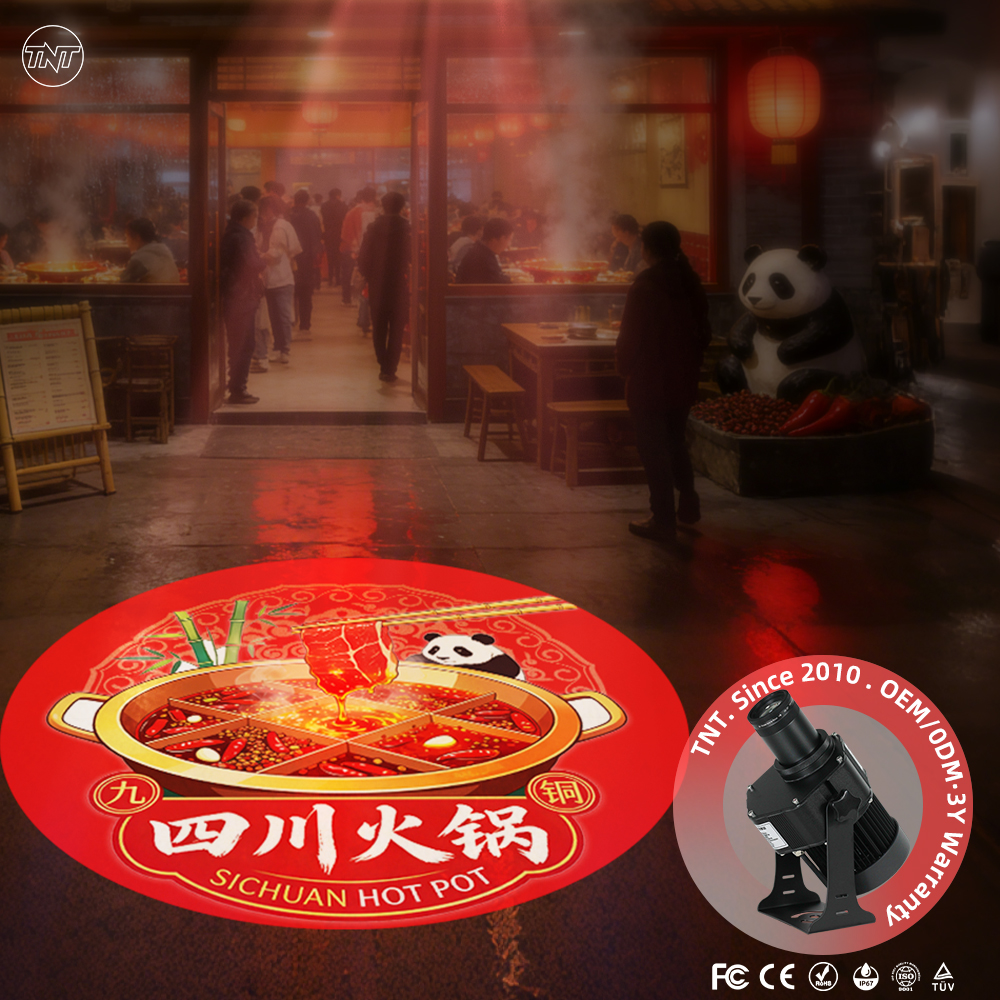
Logos often fade into the background when they are shoved into cramped corners or reduced to a size that barely registers. A mark that is too small loses its identifying details, turning a once-distinct shape into a smudge. The same happens when a logo competes for attention with busy photography, bold patterns, or oversized headlines, leaving no breathing room to establish recognition.
Another common misstep is placing the logo in areas that naturally draw the eye away, such as the far bottom edge of a layout or tucked behind interactive elements. Viewers tend to scan in predictable patterns, and if the logo sits outside those visual paths, it simply never gets noticed. Low contrast between the logo and its background further erases it, especially when a single-color version is dropped onto a similar tone.
Inconsistent placement across different materials also weakens visibility. A logo that wanders from top left to bottom right depending on the page teaches the audience not to look for it anywhere. To keep a logo from becoming invisible, it needs a consistent, uncrowded location with enough whitespace and sufficient contrast to hold its own without shouting.
How to Judge Brightness Without Getting Blinded by Specs
Lumen counts on spec sheets are best taken with a healthy dose of skepticism. Manufacturers often test in pitch-black rooms with a brand-new lamp or LED, then round up for marketing. Instead of chasing the biggest number, figure out your actual room conditions. A dim basement theater can get away with 1,200 to 1,500 ANSI lumens, while a living room with daylight needs at least 2,500 to keep the picture from looking washed out. Pay more attention to ANSI or ISO lumens, which measure average brightness across the screen, and ignore anything labeled “peak lumens” or “LED lumens” without a standardized test method.
Your eyes don’t perceive brightness linearly, and contrast plays a bigger role than raw output. A projector or TV with better black levels and local dimming can appear brighter in normal content than one with a higher peak spec but gray blacks. If possible, compare displays side by side in a room similar to yours, using the actual movies or shows you watch rather than a looping store demo. Watch how dark scenes hold up and whether shadow details stay visible without turning the whole image milky.
Out-of-the-box “vivid” modes are designed to win the brightness war in a bright showroom, but they usually wreck color accuracy and make skin tones look sunburnt. After a proper calibration, you often run a display at 60–75 percent of its max brightness, which can feel more comfortable and actually reveal more detail because highlights aren’t clipping. Look for reviews that measure brightness after calibration and check uniformity across the screen, since a hot spot in the center can mislead you about real-world performance.
Keeping Your Projector Running Past the Warranty Period
Most projector failures after the warranty ends aren't sudden breakdowns—they're the result of small, overlooked habits that gradually wear down internal components. The first step to longevity is treating lamp and filter maintenance as routine, not optional. If your model uses a traditional lamp, avoid power cycling it more than necessary; striking the lamp repeatedly shortens its life far faster than continuous use. For LED or laser projectors, the concern shifts to heat dissipation, so check that intake and exhaust vents remain unobstructed and free of dust buildup every couple of months.
Environmental factors play a bigger role than many owners realize. Projectors dislike humidity, extreme temperatures, and cigarette smoke, all of which can corrode optics or clog cooling paths. Keep the unit in a space that stays between 10°C and 35°C, and consider a small silica gel pack near the intake if your room tends to be damp. Also pay attention to the lens: cleaning it with a proper microfiber cloth and approved solution prevents scratches that gradually reduce brightness and sharpness, making the projector feel worn out long before its core parts actually fail.
Finally, don't ignore firmware updates just because the warranty has lapsed. Manufacturers sometimes release fixes for fan curves, color processing, or standby power management that directly affect hardware longevity. Set a reminder to check the support page twice a year, and if your projector has an eco mode, use it for content that doesn't demand full brightness. These small adjustments won't make the machine immortal, but they often add two or three extra years of dependable service—well past the point where most owners would have replaced it.
Using Projected Logos in Places Customers Actually Notice
Most businesses default to blank walls or empty floors for their projected logos, but those spots rarely earn a second glance. Think about the moments when customers naturally pause or look down—near a checkout counter, at the edge of a waiting area, or just inside an entrance where people shuffle their feet while adjusting to indoor lighting. A logo cast onto the floor right where someone stands to pay a bill gets seen dozens of times a day without any extra effort.
Even more effective are surfaces tied to action. Project a subtle version of your mark onto a door as it opens, a mirror in a fitting room, or the surface of a bar where drinks are placed. These aren't random decorations; they align with what the customer is already doing. A gym could project its emblem near the water fountain, while a boutique might choose the small counter where shoppers sign receipts. The key is observation—watch where eyes naturally travel, then place the logo there rather than forcing attention to an empty corner.
Lighting conditions matter just as much as location. A bright logo in a dim hallway becomes a nuisance, and a faint one near a sunlit window disappears. Test the projection at different times of day and from the angles customers actually approach. The goal is a logo that feels like part of the space, not an advertisement interrupting it. When done well, customers notice the mark without realizing they were guided to it, and that quiet repetition builds familiarity faster than any loud display.
When a Cheaper Projector Ends Up Costing More
That bargain projector might look tempting on the shelf, but the real price often reveals itself months down the line. The lamp inside budget models tends to burn out faster, and a replacement bulb can cost nearly as much as the projector itself. Suddenly the money you thought you saved is gone, plus a few extra trips to the electronics store.
Then there’s the picture quality. Cheaper units struggle with contrast and color accuracy, which means you end up cranking up the brightness and still squinting at dark scenes. For a home theater, that’s a constant low-grade annoyance—and one that pushes many people to upgrade within a year. The second purchase, plus the first, ends up pricier than just buying a decent model from the start.
Reliability is another quiet expense. Budget projectors often use plastic lenses that warp with heat, or fans that get louder over time. Repairs aren’t always straightforward, and customer support can be a dead end. Before you know it, you’re shopping for a replacement while the old one sits in a closet. Cheap upfront, but the long-term cost tells a different story.
FAQ
Focus on solid aluminum or stainless steel housing rather than plastic, check the IP rating for dust and moisture resistance, and pick a model with a quoted LED lifespan of at least 30,000 hours. Also ask about heat dissipation design—units that trap heat tend to dim or flicker within a year.
Match the lumen output to your ambient light. For a dark indoor wall or floor, 10-20 watts is plenty. If you're projecting onto a sidewalk with streetlights nearby, you'll want at least 30-50 watts. Always test a sample if possible, because a projector that looks bright in a catalog can wash out in real conditions.
In most cases, yes. The typical unit comes with a mounting bracket and can be fixed to a wall, ceiling, or stake with basic tools. You'll need to run power to the spot and set the angle carefully—usually 30 to 45 degrees from vertical. If you're not comfortable drilling into masonry or running outdoor electrical, a handyman can do it in under an hour.
Yes, and that's one thing to check before buying. Most reliable models use a replaceable glass or metal gobo that slides out. Avoid sealed units that force you to buy a whole new light if your logo changes. Keep the original artwork file on hand so you can order a new slide with the right focal length.
Once a month, wipe the lens and slide with a soft, dry cloth to remove dust and smudges. Every few months, check the housing for cracks or water ingress, especially if it's outdoors. If the image starts to look blurry, clean the gobo gently—not just the outer lens. LED bulbs don't need replacement, but the power supply sometimes does.
That depends on the IP rating. Look for IP65 or higher if the light will face rain, snow, or sprinkler spray. For fully exposed locations, IP67 gives extra peace of mind. Always use a grounded outdoor outlet and keep the power connection protected—many failures trace back to water getting into the plug, not the light itself.
Yes, placement matters more than people expect. Most gobos are designed for a projection distance of 1 to 10 feet, with the sharpest focus between 3 and 8 feet. Aim the beam straight at the surface, not at a steep angle, or the logo will stretch. If the surface is curved or uneven, pick a model with adjustable focus.
Conclusion
A reliable logo projector isn't just about buying a name brand; it's about recognizing the difference between a tool built to last and a cheap knockoff that fades in months. The first giveaway is usually the light source itself: dependable units use high-quality LEDs with honest lumen ratings, while disposable ones overpromise brightness and underdeliver once you're actually projecting against a lit storefront. Instead of chasing specs that sound impressive on paper, ask how the projector performs at your intended distance and in ambient light. A unit that looks bright in a dark demo room often disappears on a sidewalk at dusk. And here's the trap many owners fall into: a cheaper projector that needs replacing every year, plus the labor to remount and re-aim it, ends up costing far more than a sturdy model with a five-year lifespan.
Placement is the quiet killer of logo visibility. Projecting onto a busy patterned surface, aiming too high, or mounting the light at a steep angle makes even a strong logo unreadable. Think like a customer walking toward your door: the image should land at eye level, on a clean and uncluttered area, and stay sharp without spilling over edges. Once installed, basic maintenance keeps it running past the warranty—cleaning the lens, checking the housing for moisture, and using a surge protector against power fluctuations. Most importantly, put the logo where people actually pause: near the entrance, at the point of sale, or on a feature wall that draws the eye. A projected logo that no one notices is just electricity you're paying to waste.
Contact Us
Contact Person: TNT SALE
Email: [email protected]
Tel/WhatsApp: 8613544277910
Website: https://www.tntprojector.com/